MISSION & DATA AI SOLUTION BUSINESS
Budget control · Data engineering · Agentic AI

Scattered data hides unnecessary spending.
Mission & Data connects it to help you cut costs and free up time.

By bringing together HR, sales, operational and financial data, Mission & Data automates checks, flags anomalies and highlights unnecessary spending. Your teams spend less time collecting and checking figures, and more time on budget optimisation.

  • Less manual data collection

    Your data, connected and up to date.

  • Clearer budget variances

    Your budgets, contracts and invoices reconciled.

  • You stay in control

    Your teams approve the actions.

The missing layer between your tools

One connected data flow.
Three outputs you can act on.

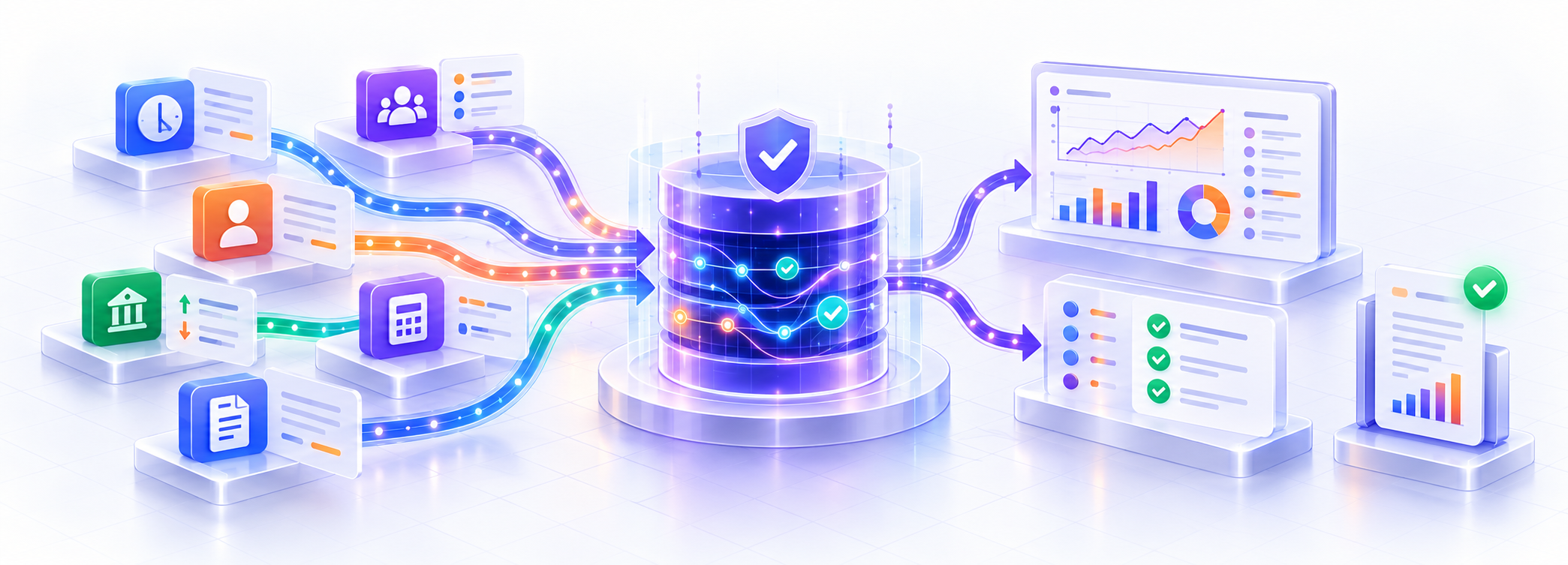
Your existing software stays in place. Mission & Data collects authorised data, reconciles it using your rules and delivers metrics you can trace back to their sources and calculations.

Data from HR systems, teams, CRM, accounting, banking and billing flows into a governed data layer, then feeds metrics, checks and reports.
Custom metricsTrack costs using your own business rules.
Cross-checksSpot differences between budgets, contracts and invoices.
Automated reportingGet up-to-date figures without rebuilding your spreadsheets.
BeforeScattered exports, copy and paste, and manual checks.
With Mission & DataReconciled data, automated checks and variances to review.
Decisions · Cross-functional assessment

How long do you spend explaining the figures before you can decide?

The report brings together four complementary views of performance. Each piece of information retains its source, definition and purpose in the decision.

HRAvailable staffAbsences + recruitment
ProjectsPlanned workloadCapacity + progress
FinanceCommitted spendingInvoices + payments
LeadershipCash flow forecastBusiness events
Variance to explainWhich combination of capacity, workload and costs is reducing your margin?
Before the meetingManagers can address the causes with confidence in the underlying figures.

Data journey · A clear pipeline

Your teams rebuild the same figures for every report.One pipeline collects, checks and updates them.

Mission & Data organises the entire data journey. Your teams can see what comes in, what is checked, what is calculated and what is ready to support a decision.

Business data sources flow through a transformation pipeline and an analytical model into a decision dashboard.
A traceable path from the source to the decision meeting.Collect → Transform → Model → Analyse
IN

Collect data

Retrieve authorised data from your software, files and databases.

APIs · exports · internal databases
OK

Transform data

Clean, standardise and reconcile information using your rules.

Python · T‑SQL
KPI

Model and forecast

Calculate KPIs, identify trends and forecast different scenarios.

OLAP · machine learning · data mining
GO

Analyse results

Refresh dashboards and prepare the information needed for your business review.

BI · decision brief
BeforeScattered exports, manual recalculations and several versions of the same figure.
→
With the data pipelineA logged, repeatable process that business teams understand.
Business functions · A shared hub

When every team has its own figures, no one has the full picture.

Your tools keep their specialist roles. The hub provides a common language for comparing their data : the same entities, reporting periods and business definitions.

HRAbsences ↔ available capacityWho is actually available?
SalesOrders ↔ receiptsWhich sales are confirmed and paid?
FinanceBudget ↔ actuals ↔ cashWhat is the impact on margin and cash flow?
MarketingSpending ↔ resultsWhich activities make a difference?
Shared data modelYour business rules

Definitions · identifiers · periods · sources · access rights

Decision 01Adjust workloads before costs overrunCapacity + project + costs
Decision 02Prioritise sales that support cash flowOrder + invoice + bank
Decision 03Reallocate spending to activities that deliverMarketing + CRM + margin
How it works · Budget optimisation

Check what no single SaaS tool can see.

Each tool can be accurate within its own scope without revealing a commitment missing from the budget, an invoice above the contracted amount or a cost assigned to the wrong project. Connecting these records helps you act before the variance only comes to light at period-end.

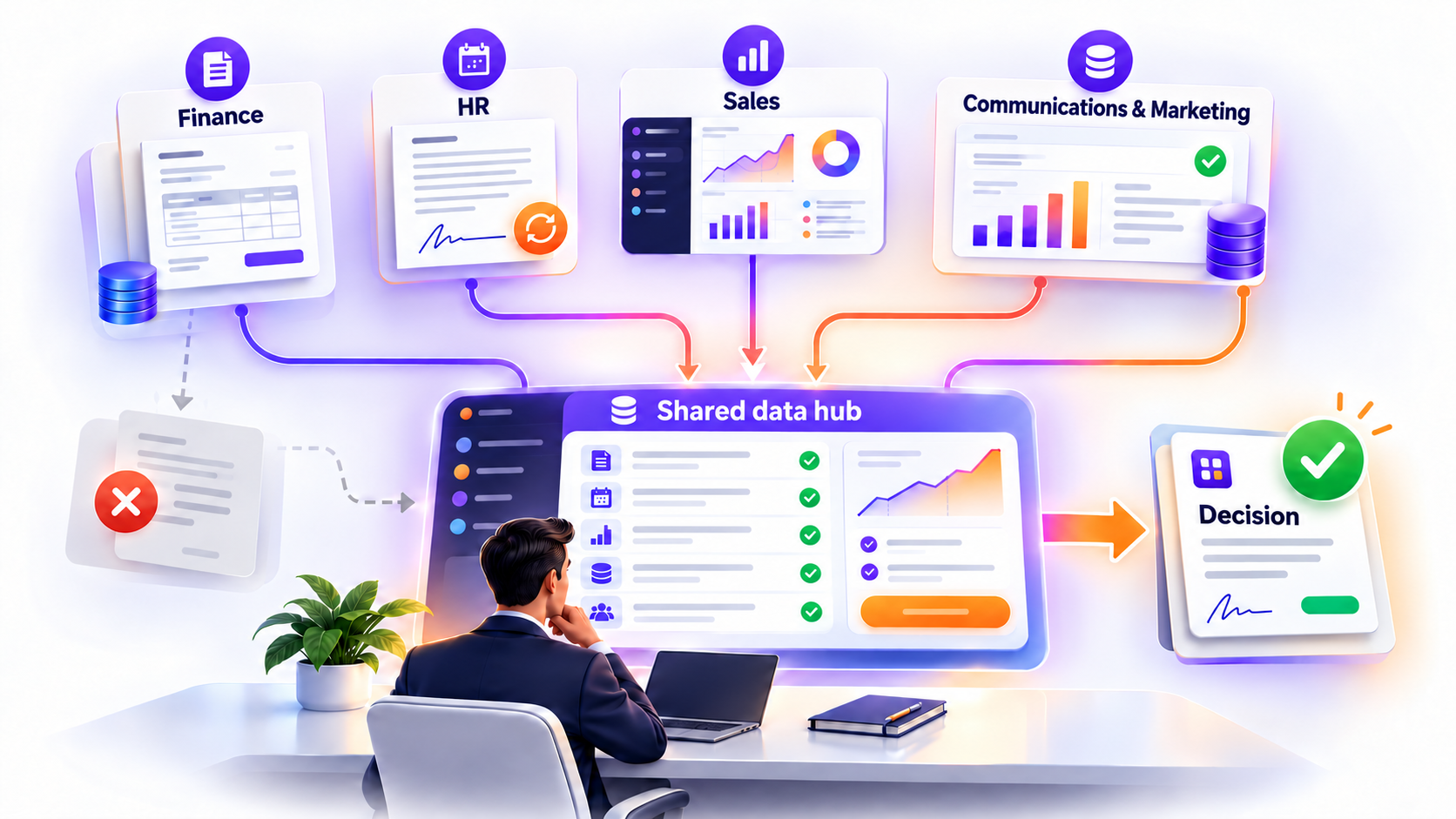
Budget control briefHuman decision
Finance, HR, sales and marketing data feeds a shared data hub before a decision is approved by a person.
Turn a warning sign into a documented budget decision
One shared cross-functional viewCompare budgets, commitments, invoices, payments, HR costs and project costs before making a decision.
Sales / CRMOpportunities, quotes and ordersWhat the sales team negotiated
Contracts & billingTerms and payment schedulesWhat should be invoiced and collected
Banking / paymentsReceipts and referencesWhat has actually been received
AccountingEntries and customer balancesWhat is recorded in the accounts
HR systems & payrollHeadcount, roles and costsThe cost of the capacity deployed
Projects / schedulingAssignments, workload and progressWhere resources have been deployed
Signal 01Contractual commitment missing from the latest budgetContract + purchasing + budget
Signal 02Invoice or payment with no matching contract or cost centreBanking + billing + accounting
Signal 03Payroll cost without a reliable project allocationHR system + payroll + schedule + project
A shared view of your budgetSee spending early enough to influence it.
01PlannedBudget, assumptions and priorities.
02CommittedContracts, orders and allocated capacity.
03IncurredInvoices, payments, time and usage.
04ReviewedKeep, renegotiate, reallocate or reschedule.
Optimisation does not mean cutting everywhere: savings are only recognised once action has been taken, approved and its actual impact measured.
Decision support · Your budget copilot

Identify spending to review and potential savings to validate.

The copilot cross-checks budgets, contracts, invoices, payments, HR costs and project costs to explain variances and support your decisions. Source-backed analysis helps your teams focus their checks, compare possible actions and track their impact on the budget.

“Which spending exceeds the planned budget, and why?” “Which invoices differ from the contract terms?” “Which recurring costs should we review for value?” “How would reallocating resources affect the project cost?”
Budget copilotContract + invoice
Which invoices differ from the contract terms?
Illustrative answer with source references

In this example, a €1,200 maintenance invoice exceeds the contracted monthly fee of €1,000 by €200. All amounts exclude VAT.

  • Sources compared: the monthly invoice and the contract pricing clause for the same service.
  • Check: look for a contract amendment, price adjustment or approved additional service.
  • Action for approval: if the difference is unjustified, request a correction and track the credit note received.
The copilot documents the options. Your teams approve the actions.
Security and data sovereignty

A shared view needs controlled access.

Access rights, logging, hosting and approvals are agreed with you. A fully on-premises architecture can keep the database, processing and AI model within your company’s infrastructure.

01On-premises deployment

Data can stay on a server controlled by your company, without calls to an external AI provider.

02Role-based access

Each user and agent can only access authorised sources, fields and reporting periods.

03Traceable calculations

Sources, rules, versions and exceptions remain available so you can understand each KPI.

04Human approval

A suggestion never automatically becomes an accounting entry or a decision.

Start with an Excel report

Which KPI does your team still rebuild across several tools?

That report becomes the starting point for mapping sources, defining rules and measuring what automation can actually save.

Discuss your budget →